I was going through the concept of closures again this time – after working with TypeScript. And I had this question in my mind: “If we already have private and # to protect our variables, then why do we need closures?”
This sounded like one of those questions where the answer looks obvious at first, but when you actually start digging into how JavaScript works under the hood, things become much more interesting.
So I investigated it. And I found something pretty cool. Before we get into closures, let’s first understand what TypeScript’s private actually does.
Let’s start with TypeScript private
class User {
	private secret: string = "hidden";
}

const me = new User();
console.log(me.secret);
I know you all are genius enough to understand this, but I have to explain it anyway. I created a class called User and added a property called secret with an initial value of "hidden". Then I created an object from the User class. After that, I tried to access the secret property from outside the class:
console.log(me.secret);What do you think the TS compiler (tsc) will do? Exactly.
It will throw an error:

So it looks like TypeScript is protecting our variable. But here is where things become interesting. private in TypeScript is primarily a TypeScript type-system feature. When TypeScript gets converted to JavaScript, the private keyword is not preserved as a JavaScript runtime privacy mechanism. For example, this:
class User {
    private secret: string = "hidden";
}
can effectively become:
class User {
    constructor() {
        this.secret = "hidden";
    }
}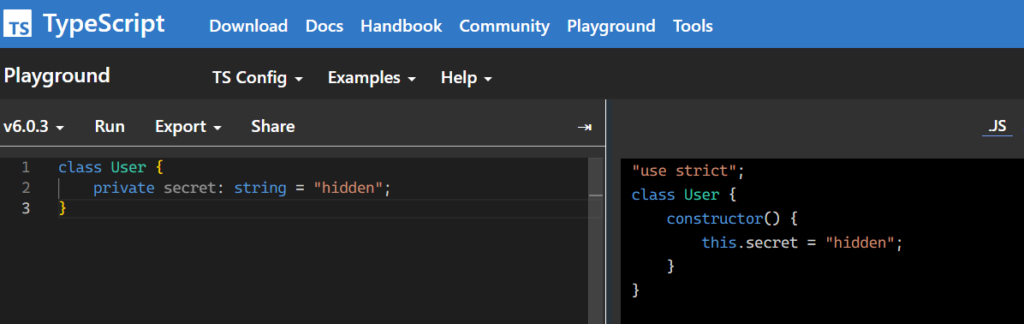
And now JavaScript does not know that secret was supposed to be private. It is just a normal property.
So this:
const me = new User();

console.log(me.secret);
can output:
hiddenThis is an important distinction. TypeScript’s private tells the TypeScript compiler:
“Don’t allow code using this type to access this property.”
It does not necessarily tell the JavaScript runtime:
“This property must be impossible to access.”
That is a very different thing.
But then we have #, right?
Yes. And this is where my original understanding needed a correction. TypeScript also supports JavaScript’s native private class fields:
class User {
    #secret: string = "hidden";
}

const me = new User();

console.log(me.#secret);
This time, the situation is different. You don’t just get a TypeScript compiler warning. The #secret field is actually private at runtime. JavaScript has a concept called a private class field, and the # syntax creates one.
You cannot do this:
console.log(me.#secret);from outside the class.
And you also cannot simply do this:
console.log(me.secret);because #secret is not the same thing as a normal property named secret.
You may to think of it like this:
me["#secret"]But that doesn’t work either. The # syntax is not simply a naming convention. The runtime has an actual concept of private fields. So we now have two different things:
private secret: string;and:
#secret: string;The first is primarily enforced by TypeScript’s type system. The second is enforced by JavaScript’s runtime semantics. This distinction is important.
So where do closures come into the picture?
Now we get to the interesting part and I love this one. Before JavaScript had private class fields, developers still needed a way to create data that couldn’t simply be accessed from outside. And one of the most powerful mechanisms JavaScript already had was: Closures.
Consider this:
function createUser() {
    let secret = "hidden";

    return {
        getSecret() {
            return secret;
        }
    };
}

const user = createUser();

console.log(user.getSecret());
This prints:
hiddenBut notice something interesting.
There is no:
user.secretThere isn’t even a secret property on the returned object. The secret variable belongs to the lexical environment created when createUser() executes. The returned getSecret() function remembers that environment.
And that is the core idea behind a closure.
A function can retain access to variables from the scope in which the function was created, even after that outer function has finished executing.
So when we do:
const user = createUser();the createUser() function finishes.
Normally, you might expect its local variable:
let secret = "hidden";to disappear.
But getSecret() still has access to it. Why? Because getSecret() closes over secret. Hence the name: Closure.
This gives us something interesting
We can use closures to create private state without exposing the actual variable.
My favorite example:
function myCounter() {
    let count = 0;

    return {
        increment() {
            count++;
        },

        getCount() {
            return count;
        }
    };
}

const counter = myCounter();

counter.increment();
counter.increment();

console.log(counter.getCount());
The output is:
2But this does not work:
console.log(counter.count);because count isn’t a property of counter.
It is a variable inside the lexical environment captured by the methods. The object has access to the behavior, but the actual state is kept outside the object. We have created a kind of encapsulation using the language’s lexical scoping mechanism.
But isn’t # better than closures?
Not necessarily. They solve related problems, but they are not the same feature.
Consider a class:
class User {
    #secret = "hidden";

    getSecret() {
        return this.#secret;
    }
}
Here, #secret is explicitly private class state and the object owns the private field. While the runtime knows about it.
With a closure:
function createUser() {
    let secret = "hidden";

    return {
        getSecret() {
            return secret;
        }
    };
}
the secret variable isn’t an object property at all. It lives in the surrounding lexical environment. So the mechanisms are fundamentally different.
With #, you’re saying:
“This object has a private field.”
With a closure, you’re saying:
“This function has access to state from its surrounding scope.”
And that distinction becomes useful when designing APIs.
There is another important difference
Closures don’t just provide privacy. They provide state that can be shared between multiple functions.
For example:
function createBankAccount(initialBalance) {
    let balance = initialBalance;

    return {
        deposit(amount) {
            balance += amount;
        },

        withdraw(amount) {
            balance -= amount;
        },

        getBalance() {
            return balance;
        }
    };
}
Now:
const account = createBankAccount(1000);

account.deposit(500);

console.log(account.getBalance());
gives:
1500But there is no public:
account.balanceproperty.
Both deposit() and withdraw() and getBalance() have access to the same closed-over variable:
balanceThis is one of the reasons closures are so fundamental to JavaScript. They are not merely a trick for hiding variables. They are a mechanism for maintaining state across function calls.
So what was wrong with my original understanding?
My initial conclusion was:
“Closures gives us the runtime hidden mechanism while TypeScript
privateand#give you compile-time alerts.”
This is close, but it needs an important correction. TypeScript private is primarily compile-time access checking. JavaScript #private is runtime-enforced privacy.
Closures are neither simply “another private keyword” nor merely a compile-time mechanism. Closures arise from JavaScript’s lexical scoping rules. They allow functions to retain access to variables from their surrounding lexical environment.
That capability can be used to implement encapsulation and private state, but closures are much broader than privacy.
You use closures for things like:
function createMultiplier(x) {
    return function (y) {
        return x * y;
    };
}

const double = createMultiplier(2);

console.log(double(10));
Here, the purpose isn’t really privacy. The returned function remembers x. That’s a closure.
The same mechanism can be used for private state, factories, callbacks, event handlers, memoization, function factories, and many other patterns.
The mental model I now use
I think about these three concepts differently.
TypeScript private:
class User {
    private secret = "hidden";
}
Think:
“The TypeScript type system should stop me from accessing this.”
JavaScript #private:
class User {
    #secret = "hidden";
}
Think:
“The JavaScript runtime should treat this as a genuinely private class field.”
Closure:
function createUser() {
    let secret = "hidden";

    return {
        getSecret() {
            return secret;
        }
    };
}
Think:
“This function remembers variables from the scope where it was created.”
And that last one is the key. Closures are not obsolete just because JavaScript now has #private. They solve a much more fundamental problem.
#private is a language feature specifically designed for private class fields.
Closures are a consequence of lexical scoping and first-class functions. You can use closures to build private state, but you can also use them for many things that have nothing to do with privacy.
One final correction about “under the hood”
There is also a subtle point worth mentioning. It would be incorrect to conclude that:
“
privateand#are both eventually converted into normal JavaScript properties.”
That is true for TypeScript’s private in the normal emitted-JavaScript model, but it is not true for native JavaScript #private fields.
For example:
class User {
    #secret = "hidden";
}
is using a JavaScript runtime feature.
Depending on your compilation target, TypeScript may preserve that syntax or transform it for older JavaScript targets, but conceptually the language semantics still require private-field behavior.
So when thinking about privacy, don’t put private and #private into the same bucket. They look similar in TypeScript, but they have different enforcement models. And closures are yet another mechanism entirely.
So, do we still need closures?
Absolutely. In fact, I would say the better question is not:
“If we have
privateand#, why do we need closures?”
The better question is:
“What problem is each mechanism actually solving?”
private gives TypeScript-level access restrictions.
#private gives JavaScript runtime-enforced private fields.
Closures give functions persistent access to their lexical environment. And once you understand that difference, closures stop looking like an old workaround for private variables. They become what they actually are:
One of the fundamental mechanisms that makes JavaScript’s programming model work.
That was the interesting part of revisiting closures after working with TypeScript. Sometimes learning a newer feature doesn’t make an older concept irrelevant. It actually gives you a better question to ask about the older concept:
“Why was this mechanism useful in the first place?”
And in the case of closures, the answer goes much deeper than just hiding a variable.